Interactive 3D / Case study
Swiss lever escapement
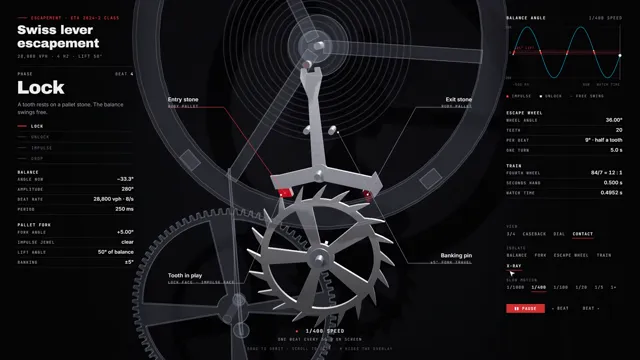
A working 3D model of a watch escapement that you can drive in the browser, built to show our 3D explainers service
In short
A 3D model of a Swiss lever escapement that runs in the browser. Watch time is its only input, its figures come from published ETA 2824-2 data, and a clearance check confirms that no part passes through another.
- State
- Live in the browser
- Beat rate
- 28,800 vph
- Lift angle
- 50°
- Escape wheel
- 20 teeth, 5 s per turn
- Built with
- JavaScript / Three.js / WebGL / Python / ffmpeg
The brief
The problem
An escapement is hard to explain in words. At 28,800 vibrations per hour each beat lasts 125 milliseconds, and in that time a tooth unlocks, pushes the fork, drops and locks again. It is also easy to animate badly. Teeth pass through the stones, or the wheel turns at a rate the beat cannot produce. We wanted a demonstration that someone who knows watches could check against the published figures.
What we did
Our approach
The figures come from published sources: 28,800 vibrations per hour, a 50° lift angle from the ETA technical sheet, a 20-tooth escape wheel and a 12:1 train to the seconds wheel. A sources file lists each one with where it came from and how sure it is. A small math module takes watch time and returns the pose of every part. The balance swings as a sine, the fork follows the impulse jewel by exact geometry, and the escape wheel follows the pallet stones. We build the 3D parts in code from the same outlines, and the on-screen console reads its gauges from the same state. A clearance script samples two full beats every 25 microseconds of watch time and tests every tooth against both stones. The live page and the film run the same code. A script generates the film's sound from the same timeline, so every tick lands on a modelled drop. ffmpeg then joins picture and sound.
Features
What it does
- 01
Watch time is the only input to every part and gauge
- 02
Camera views, part isolation and an x-ray view
- 03
Slow motion from 1/1000 to real speed, with single-beat stepping
- 04
Clearance check of every tooth against both stones
- 05
Film and score rendered from the same code as the page
Results
What happened
- A live page with camera views, part isolation, an x-ray view, slow motion from 1/1000 to real speed, and pause-and-step for a single beat
- The escape wheel moves exactly 9° per beat and turns once every 5 seconds, which the tooth count and beat rate require
- An impulse jewel radius of 0.628 mm, derived from the 50° lift angle and checked by hand
- The worst overlap the clearance check found was 4 × 10⁻¹⁵ mm, so parts touch but never pass through each other
- An 18.5 second film at 1920 × 1080 with a generated score, rendered from the same code as the page
- Some parts are modelled, not measured. The balance moves as a pure sine, the teeth are pointed rather than club-shaped, and there is no guard pin or safety roller.
Architecture
Under the hood
Watch time drives the math, and everything else reads from it: the parts, the lighting, the gauges, the live page, the film and the sound.
Watch time drives the math, and everything else reads from it: the parts, the lighting, the gauges, the live page, the film and the sound.
Services
What this work shows we do
Interactive 3D explainers
Service pageA working 3D model of a machine or product on one web page, with a video cut of the same tour.
How we work
How a change reaches production
The same five gates for our own products and for yours. Nothing reaches your customers on the strength of a demo.
- 01 · Isolate
Its own branch and workspace
Every change starts in a separate copy of the code, so work in progress never touches what is live.
git worktree add .worktrees/your-change - 02 · Build
Engineers with AI agents
Agents write and test code beside us. They hold no passwords: every call they make goes through our gateway, which checks it and logs it.
agent → gateway → policy · audit · call - 03 · Prove
Evidence, then review
Tests, before-and-after screenshots of the running app, then independent reviewers. It does not move on until no serious finding is left.
review: 0 high · 0 medium → pass - 04 · Ship
Deployed and checked live
The pipeline builds and deploys. Then we check the running service itself, not just a green build.
replicas 1/1 · image sha matches · health 200 - 05 · Watch
Checked every night
Each integration we run is tested against its provider every night, so a changed API is caught before your team notices.
nightly: each integration vs its provider